ホームページ制作|札幌
ホームページ制作|札幌
北海道札幌市北区北6条西6丁目2-1朝日プラザ偕楽園506号室
営業時間 7:00-24:00 TEL/FAX 011-768-8116
代表:グレン チャールズ ロウ
33 Online (オンライン中(15ゲスト Guests 18検索ボート Bots, )

Toyohira River Flooding (Susukino, Chuo-ku, Sapporo, Japan)

2011-09-06th Toyohira River Flooding (Susukino, Chuo-ku, Sapporo, Japan)

Toyohira River Flooding

2 typhoons almost made it up here together and there has been a lot of rain. It’s the first time in 10 years I’ve seen the Toyohira river flooding.

Toyohira River Flooding


You may be interested in these articles:

The new Sony WX30 might need a quick firmwear update to fix the black and white (monochrome) settings

Amazing Macro Photography: The Transparent Ants Whose Multi-coloured Abdomens Show Exactly What They’ve Been Eating

CDs, DVDs and Blu-ray Discs are Old: New M-Disc Technology Promises Permanent Data Retention


Ezo Wolf – El Lobo

Ezo Wolf ・ 蝦夷ウルフ ・ El Lobo ・ Neukdae ・ Волк ・ Wolf
Hokkaido, Japan
el-lobo, ezo-wolf, okame, Sapporo, Hokkaido, Japan (http://a4jp.com)

The Ezo Wolf is Gone for Good: A few people I’ve met in Susukino swear these wolves still hang around in the back alleys of Susukino, Sapporo, but it’s usually after a few beers or tequilas, while sitting on a bar stool or at the counter when they seem to appear out of nowhere… Better watch out ;)

* The northern Japanese island of Hokkaido, as well as Sakhalin, the Kuril islands, the Kamchatka Peninsula, and the Iturup and Kunashir islands, used to be where you could find the Hokkaido wolf (Canis lupus hattai, formerly known as Canis lupus rex), also known as the Ezo wolf.

The Ezo wolf was typically grey in color with slightly reddish brown and/or black markings on its body. It was also significantly larger than the wolves found on Honshu probably because of the harsh weather, climate of the area and larger pray like the red deer it used to eat. The Ezo wolf descended from Siberian wolves from the Asian mainland, and the Hokkaido subspecies retained a size closer to their large ancestors compared to the wolves found on Honshu.


2012: Closing Sale: Unfortunately the Ezo Wolf bar was with us only for a short time.

2011-09-20th: Looks like the Ezo wolf is back. There is a Tex Mex themed international bar called El Lobo (エル・ロボ) in Susukino. The address is South 5 West 4, Susukino, Chuou-ku, Sapporo, Hokkaido, Japan (札幌市中央区ススキノ南5条西4丁目9-9 入口南向き). This izakaya/restaurant in Susukino doesn’t have a table charge and lots of people are saying the food is nice. :)  011-211-6919. I haven’t been there yet but will try and check it out sometime next week.


Sony DSC-WX30 and DSC-TX55 Review – Black and White Settings Missing (Broken???) | ソニーDSC-WX30 – Release Date

Review: Sony DSC-WX30 and DSC-TX55 Black and White Settings Missing (Broken???) | ソニーDSC-WX30・DSC-TX55
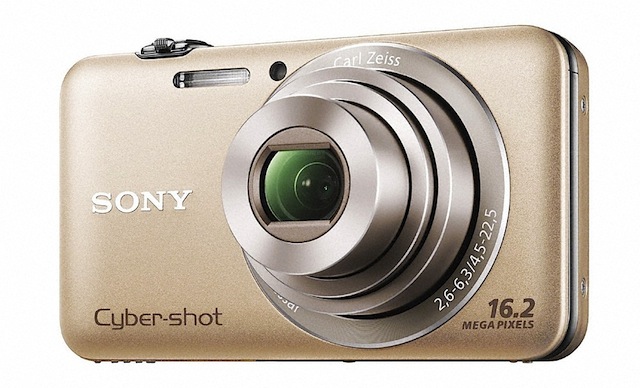
I just bought a Sony DSC-WX30 and the filter settings for black and white (monochrome) photos are missing! The rich black and white photos take about 5 seconds to process even on the fastest SD card before you can take the next shot and you can’t adjust how much the filter is used. :(


Pro and Cons of the Sony DSC-WX30


Pros: It can use SD cards. Not so much noise.  The shots taken with the food settings look quite good and the toy camera shots are fun. It is quite small and lots of other companies are making screen protectors for it. A nice little box for a little camera. The lack of packing is also a plus for someone that likes to keep everything :)

Cons: It’s the worst camera in the world for taking black and white (monotone) photographs. The rich-tone monochrome photos take about 5 seconds to process even on the fastest SD card before you can take the next shot and you can’t adjust how much of the filter is used. Your shots look great in black and white until you push the button and the camera turns them into a sketch like image. Where is the setting to just take a black and white (monochrome) image?????? :( I wouldn’t get one of these until the firmware update is released to fix the problem.

Sepia was left out of the filter settings.

You can’t choose your own color with the partial color filter only the colors in the menu (red, green, blue and yellow…)

There isn’t a color shift/adjustment setting on the WX30, like on lots of other camera coming out.

The camera doesn’t save your settings properly. If you change the height/position of the miniature camera mode, selecting which parts of the image are in focus and blurred in the menu, and turn the camera off then back on again, it forgets the position/height you set, and you have to go through the menu again every time you turn on the camera.

Short battery life. The man in the shop said 4 hours recharge or 2 hours if you buy the separate high speed charger. * Maybe I was given a high speed charger with my now broken Sony DSC-T30 (the camera will all the right settings including black and white ;) and sepia).

USB 2.0 speed cable connection (*not a problem if you just put your card in a USB 3.0 card reader).

Doesn’t have a 1cm macro mode like some of the other Sony cameras. *Update 2011-09-5th: Macro mode doesn’t turn on sometimes.

None of the Japanese cameras have English menus and the international models cost more here.

If someone is sitting next to you and you take a shot of them with the flash on they get a blast of white light that doesn’t look very nice (auto plus mode…).

2011-10-04th: I tried to take a photo of a dragonfly today and the camera’s macro mode didn’t work properly. I touched the screen where I wanted the camera to focus and everything looked good but when I pushed the shutter button the camera focused on the background and the dragonfly was out of focus. So I looked through all the menus to see if I could just set the camera in macro mode but I couldn’t find anything. After that I went to Bic-camera to ask the Sony staff where the macro settings were. One lady said everything is automatic on the DSC-W30 camera so there aren’t any settings… The lady also said if the colors of objects are similar to the background colors then the macro mode might not turn on automatically… Why didn’t you just add a macro setting to the menu Sony? I hope they release a firmware update soon to fix all these setting problems!


The Sony DCS-WX30 was released and on sale on August 5th, in Japan.


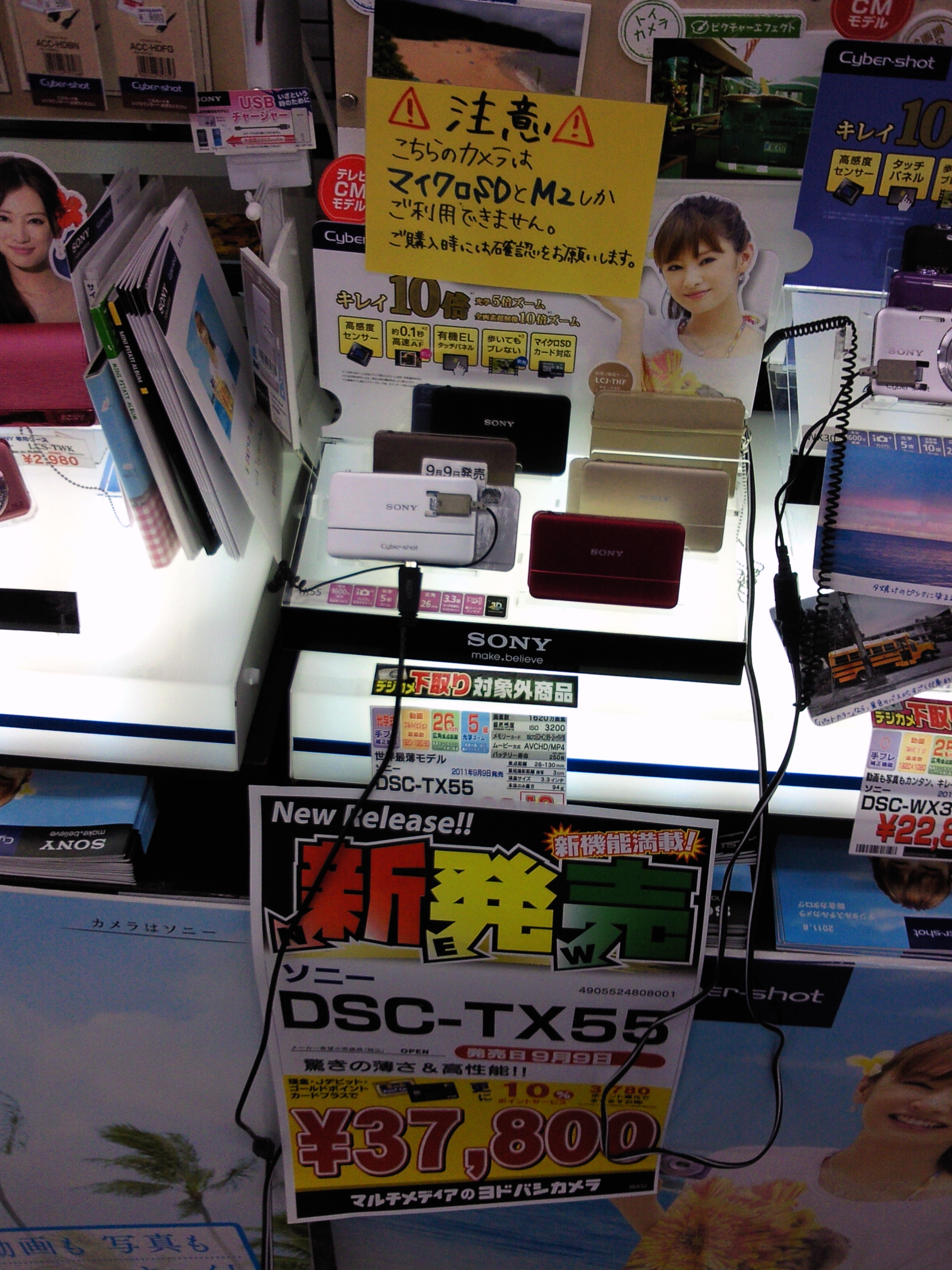
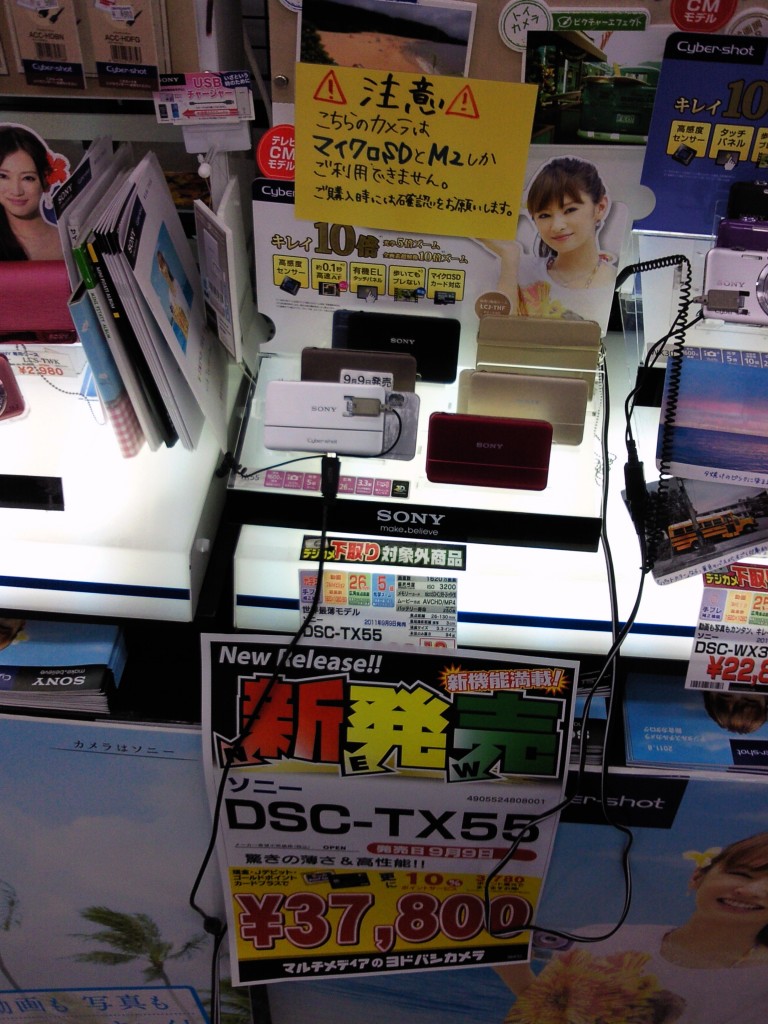
I hope the Sony DSC-TX55 doesn’t have the same problems. Sony is going to do a lot of firmware updates before it releases this digital camera in the shops on September 9th, 2011.
ソニーDSC-TX55・DSC-WX30 問題 モノクロとマクロ


*The warning sign just says you might not be able to use some micro SD or M2 cards with this camera.

2011/09/09th: Nothing was changed on the menu of the DSC-TX55. It has the exact same problems… The settings don’t save when you turn off the camera. Macro modes don’t work properly and there isn’t a way just to turn them on. The level of black and white filter can’t be set either. Women with black hair look like they have heaps of gray hairs (oh no). I hope the firmware fix comes out soon.

I didn’t have time to check how accurate the OLED was but I will after my trip to Australia.


You may be interested in these articles:

Toyohira River FloodingToyohir

Amazing Macro Photography: The Transparent Ants Whose Multi-coloured Abdomens Show Exactly What They’ve Been Eating

CDs, DVDs and Blu-ray Discs are Old: New M-Disc Technology Promises Permanent Data Retention

Style WordPress Menu Items with Background Images

Every menu item in WordPress has a unique ID and they can be styled with background images if you want. You just need to find the id to style the items with CSS using background-images.

Finding the id with Google Chrome browser
If you have the Google Chrome Browser go to your page and right click on the thing you want to know the id of, then select Inspect Element from the menu. After that, a screen will pop up down the bottom of your browser. Select Elements if it isn’t already on that tab.

Finding the id with the Firefox browser
Right click on the object you want to find the id of, then click on Inspect Element from the menu. A screen should open at the bottom of the browser. Make sure it is on the HTML tab if it is not. Just by moving your mouse over lines of code, you can see which lines make the parts of the page.

Just the page source
Of course you can also just look at the page source (HTML code) in almost any browser, if you want to, but I like being able to mouse over things and get the highlighted boxes ;)

After you have the id you just need to add some lines of CSS to edit the menu. Here are some examples:


CSS Example 1:
ID-of-the-thing-here { background-image: url(/images/foo.gif) }

CSS Example 2:
ID-here { background-image: url(http://a4jp.com/images/icons/home2.png); other-bits-of-code-here-if-you-want–delete-this-if-you-do-not-use-it;}


* I usually use GIF, JPG or PNG files.

** GIF or JPG files work the best if you want your images to display on older mobile devices properly. For some reason the transparent part of PNG files becomes black on my 1st Generation iPod and older versions of Internet Explorer.


Glen Rowell
a4jp.com 

How to make your WordPress 404 page work in Internet Explorer 5, 6, 7, 8, & 9

WordPress 404 Error Pages in IE 5, 6, 7, 8, & 9

When you use WordPress and try and open a page that doesn’t exist in internet Explorer 5, 6, 7, 8, or 9, the 404 error page doesn’t display like in other browsers.

If you also have this problem just follow the simple instructions below, to get your 404 error page working.

Open your 404.php with a text editor or your usual program. It is usually in the template folder of the theme you are using, and just add these 2 lines of code, before everything else at the top of the opened file, then save it and upload the file.

<!--?php ob_start(); ?--> 
<!--?php header("HTTP/1.1 404 Not Found"); ?-->

Your 404 error page should be working perfectly now in IE5, IE6, IE7, IE8 and IE9.

Glen Charles Rowell

http://a4jp.com


Here is an example of the code I am using on one page:

<?php ob_start(); ?> 
<?php header("HTTP/1.1 404 Not Found"); ?>
<?php get_header(); ?>
<div id="content">
	<div class="post">
		<h2 class="title title_page"><?php _e('Error 404 - Not Found', 'zbench'); ?></h2>
		<div class="entry">
			<p><?php _e('Sorry, but you are looking for something that isn&#8217;t here.', 'zbench'); ?></p>
			<h3><?php _e('Random Posts', 'zbench'); ?></h3>
			<ul>
				<?php
					$rand_posts = get_posts('numberposts=5&orderby=rand');
					foreach( $rand_posts as $post ) :
				?>
				<li><a href="<?php the_permalink(); ?>"><?php the_title(); ?></a></li>
				<?php endforeach; ?>
			</ul>
			<h3><?php _e('Tag Cloud', 'zbench'); ?></h3>
			<?php wp_tag_cloud('smallest=9&largest=22&unit=pt&number=200&format=flat&orderby=name&order=ASC');?>
		</div><!--entry-->
	</div><!--post-->
</div><!--content-->
<?php get_sidebar(); ?>
<?php get_footer(); ?>

Tasting The Rainbow: The Ants Whose Multi-coloured Abdomens Show Exactly What They’ve Been Eating

Tasting The Rainbow: The Ants Whose Multi-coloured Abdomens Show Exactly What They’ve Been Eating

from Design You Trust – Design and Beyond! by Dmitry
Ants drinking different colored liquids

Ring of colour: An ant’s transparent abdomen shows the colour of the food they have eaten. (Mohamed Babu / Solent News & Photo Agency)

Close-up of an ant drinking yellow liquid - transparent body

A good palette: Some of the ants even wandered from one colour to another, creating new combinations in their stomachs. (Mohamed Babu / Solent News & Photo Agency)

Close-up of an ant drinking green liquid - transparent body

Eating their greens: The ants seemed to prefer lighter colours such as greens and yellow to darker blues. (Mohamed Babu / Solent News & Photo Agency)


Here are some articles you might like:

New M-Disc Technology Promises Permanent Data Retention

New M-Disc Technology Promises Permanent Data Retention

In the future, our discs will be made out of rocks or something like that, and some people say that is a good thing LOL. Too bad for all the people that bought CDs, DVDs and Blu-Ray Discs, like me… You are of course going to need a new burner strong enough to etch your data as well. ;) Read more below.
I’ll definetly be waiting for the 25 and 50Gb discs…
Maximum PC – Brad Chacos
More and more folks are turning to cloud services like Dropbox to store their oh-so-precious private data, but when it comes to truly valuable info, it’s still a good idea to keep a physical backup disc around in case those virtual services crap out on you. Then again, CDs and DVDs scratchwaaaaay too easily and have limited shelf lives. If you’ve ever been screwed by a big gouge across an important backup disc, you might want to check out the new optical media that’s hitting the market soon. Supposedly, it lasts forever, and the Department of Defense vouches for its resiliency.

They’re called M-Discs and they’re being brought to market a start-up company called Millenniata, Computerworld reports. M-Discs ditch the traditional reflective layer found in standard physical media discs and instead etch the information directly into the body of the multi-layered disc itself, which is made of an undisclosed stone-like substance. Millenniata says that any device that can read a DVD can read an M-Disc – the only special equipment necessary in the whole process is an M-Disc burner.

That’s cool in and of itself, but Millenniata also claims that M-Discs are darned near impervious to damage. They told Computerworld you can toss an M-Disc in liquid nitrogen, then dump boiling water all over it, and nary a byte of data will be damaged. A DoD study found no data loss after subjecting the M-Disc to grueling conditions — a claim no other disc can make.

Although LG’s supplying the initial round of M-Disc burners, Millenniata’s CEO says that any DVD hardware manufacturer can make the jump to M-Disc by installing a firmware upgrade on their machines. The M-Disc’s staying power comes at the cost of burn speed, however; you can only write to them at a 4x rate. At that speed, it’s almost a good thing that M-Discs will only be able to match standard DVD capacities of 4.7GB when they hit the shelves in October for $3 a pop. Millenniata puts their money where their mouth is by offering a lifetime warranty for the discs.

Image credit: troveas.com


You may be interested in these articles:

Amazing Macro Photography: The Transparent Ants Whose Multi-coloured Abdomens Show Exactly What They’ve Been Eating

Top 5 ways to use the Kinect 2 on Windows 8

Top 5 ways to use the Kinect 2 on Windows 8

by ONUORA AMOBI on JULY 11, 2011

Kinect on the pc

So the Kinect is one of the coolest things that has come from Microsoft in quite a while. The camera that connects to the XBOX 360 allows you to control certain types of software, programs and games etc with hand movements and gestures.
I have put it out there from the beginning that I think that a Kinect 2 is inevitable with a reduced footprint for the desktop.

This would allow the desktop user to also control their PC with hand movements and gestures.

It also got me thinking though, what would I do if I had Windows 8 in front of me and a Kinect 2 on my desktop.

Here are the top 5 ways to use the next version of the Kinect on Windows 8.

1) Controlling the Windows User Interface: If I didn’t have to use a Mouse to open Windows and file folders, I would be a happy camper. Being able to point to things and have them click and open would make exploring Windows a simpler experience I think.

2) Video gaming: Call of Duty on the PC would be interesting if you could use a plastic gun and have the Kinect feed the coordinates to the characters on the screen. The being able to look left and right and have the screen follow your eyes would be cool.

3) Editing Video: Being able to scroll through frames with your fingers – priceless.

4) Web Browsing: ability to scroll to the next page with a finger gesture would be cool.

5) Watching Movies: Similar to what’s possible on the Xbox 360, this one would be big. The ability to rewind with a fingertip is hard to beat.

Those are all cool and I as I think this through there are 2 things that jump out at me.

First, any Kinect experience would seem to be incomplete if you couldn’t use voice commands as well. The two do seem to go hand in hand.

Next, you do have to wonder though whether your arms would get tired after raising them and using different muscles day in and day out for hours/days at a time.

Windows 7 – Search File Contents

Question
In windows 7, I want to search for all files containing “a word or phrase in the file”, like in the standard XP search box.


Applies To: Windows | Windows 7 | Files, Folders, and Search

I do NOT want to say the file name; file type; drive letter; etc. – or anything like that.

I tried searching for this type of thing but just can’t find any discussion about it. And of course, not having this type of search is kind of driving me insane. It is exactly what we have a computer for.

No 3rd party programs please.


I’ve been looking into this because I know the search has been failing me as well. I think the difference in whether Windows search works or not depends on the FILE EXTENSION which contains your search text. For example, if you look for the word “spam”, it will be found if it is in a whatever.doc file, or whatever.txt file. However, if you were to rename the file to whatever.xyz, it would no longer find the word.

Here are all the steps I think you need to follow to actually search:

1. Make sure that Windows 7 is actually going to search files with your extension, and it appears that using this list properly is important *whether or not you are looking in an indexed location*!!
a. Hit the start button and type “search” in the search box.
b. Select “Change How Windows Searches”
c. Hit “Advanced”
d. Select the “File Types” tab.
e. Make sure the file extension for the files you want to search in is on the list *and* is set to “Index Properties and File Contents” (yes, pick your jaw up off the floor). I know this appears to be for file indexing, but it does seem to make a difference on whether you find the file in non-indexed locations as well.
f. Say “Ok” and exit all the dialog boxes

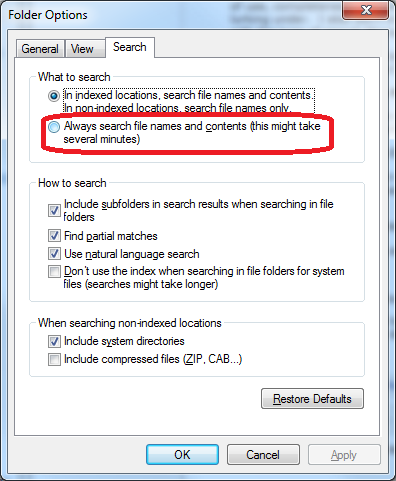
2. Actually perform your search on the folder in question. Depending on some other settings you may have to type “content: spam” to find “spam” *in* the files instead of files with the word “spam” in the name. Alternately, if you press the “Alt” key when you’re exploring in the folder, you can choose “Tools / Folder Options” go to the “Search” tab and select “Always search file names and contents”.

If what I have written is actually correct, then IMHO Microsoft has coughed up the ball bigtime on this one. Personally, I now recognize that I can’t use the search feature, and I’m installing Cygwin so I can use “grep” to search the contents of files. Not cool and not amused.

Good luck to all the searchers.
~Pete

* This article was rewritten and edited by Glen Charles Rowell from a4jp.com

3DSMAX Removing a Texture or UVW Map to Go Back to the Default Color

In 3DSMAX if you want to remove the texture you applied and have everything go back to the default color or settings, just click on the hammer icon (Utilities) on the right side of your screen, in the menu, then press “more” and look for “UVW Remove” in the list. Select an object and either press the remove “Materials” button or “UVW” button. That all.

Utilities > More… > UVW Remove > select object then push “Materials”

A4JP.com

Glen Charles Rowell

A4JP.COM DESIGN
Copyright & NPO Study © 2026